Draft day
Run an auction draft
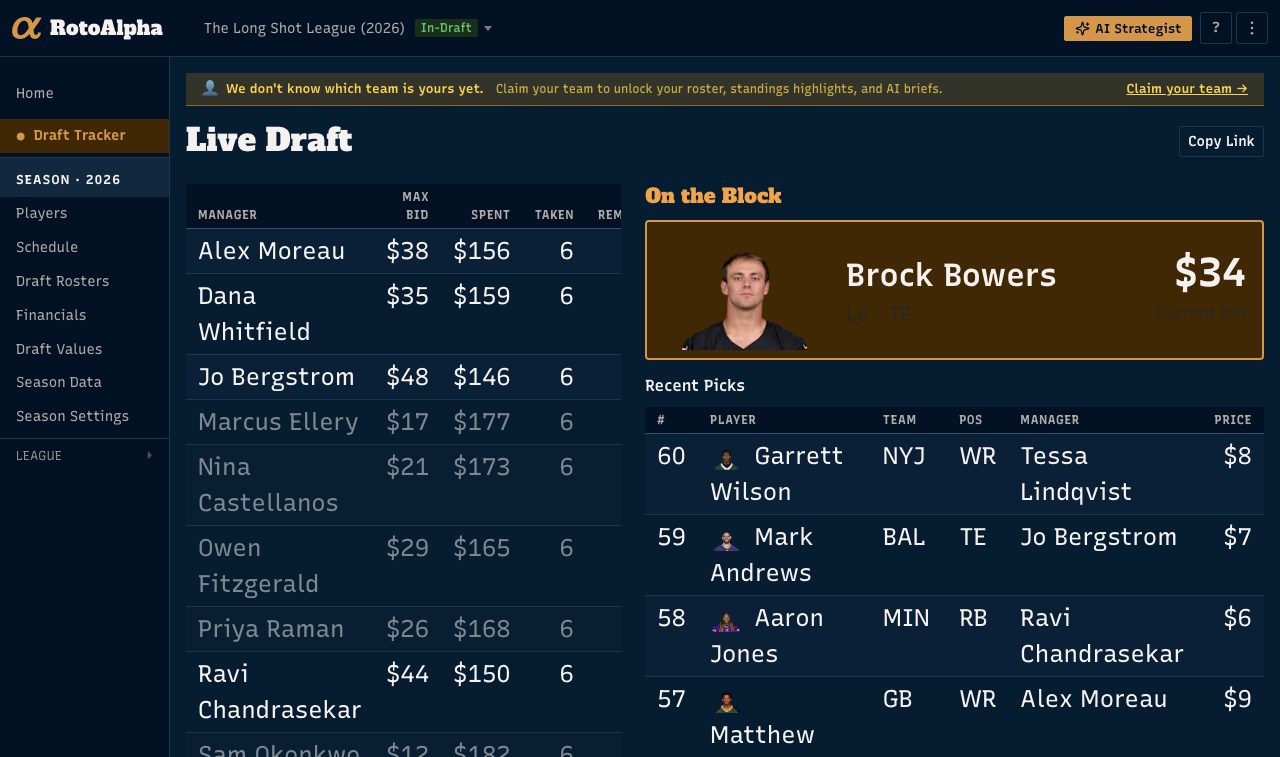
An auction is a different draft from a snake, and RotoAlpha runs it on a different screen. Instead of a pick order, you have a player on the block, a climbing bid, and twelve budgets to keep track of.
Getting in
Set the season's Draft type to Auction with a budget per team, under Season Settings. When the season phase reaches In-Draft or Keeper-Draft, Draft Tracker appears at the top of the left sidebar with a live dot, and opens the auction board.
Two more entries appear alongside it during an auction:
- Financials, showing every team's total spent, available, and remaining budget, along with dollars per roster spot filled and dollars per spot still to fill.
- Draft Values, grading what each team has bought against what RotoAlpha projects it to be worth.
The nomination cycle
Work from the Draft Room in the sidebar. It is the same player board the Players link opens the rest of the year; while the draft is live it takes the Draft Room name.
- Nominate. Find the player being put up and press Nominate. They become the player on the block, and the draft page shows them large with the current bid beside them.
- Track the bid. Update the price as the bidding climbs.
- Sold. Press Sold, pick the winning manager, and the sale is recorded. The player leaves the pool and that manager's budget drops.
Clear cancels a nomination that is still in progress, and also undoes a sale if a player was recorded to the wrong team or at the wrong price.
Watching the money
Remaining budget is the auction's real board. RotoAlpha shows the money two ways: the Financials page for the whole league at once, and each manager's remaining budget on the draft page while the draft is live.
Your league-mates see the money too, on the public page. Budgets during an auction are league-public on purpose, because a room where only one person can see who is out of money is not a fair auction. Your private notes and your own projected values stay private. See share the public draft page.
Keepers in an auction
If keepers are assigned before the draft, the auction board tracks them separately: Remaining Keepers lists which kept players are still to be processed, and tells you when they are all done.
Under a right-of-first-refusal system, a kept player goes on the block like anyone else, and the board shows both numbers at once: the current bid, and what it would cost the incumbent manager to match after their discount. Press Keep to record the incumbent matching, or Sold to record somebody else winning them.
Set the rules first, under Settings, then Keepers. See set up keepers and keeper prices.
A bad price
If a recorded price is larger than a whole team's budget it cannot be right, so RotoAlpha flags it rather than folding it into your history. A flagged pick is left out of every history and manager-profile number until you correct it. Click the flag to fix it.
After the draft
Move the season to Post-Draft. Draft Results holds the full board and exports it as a CSV, and Draft Values grades the whole room.
If your auction happened somewhere else and you want the results in RotoAlpha afterward, you do not have to enter them one at a time: see paste your draft results.
More in Draft day
- Mock drafts and draft plansRehearse the draft, then keep what worked as a plan you can test.
- Build and print a cheat sheetA tiered, printable board built for your league, not a generic top 200.
- The live draft roomEntering picks on draft night, what the room tells you, and how to fix errors.
- Share the public draft page with your leagueA no-signup live draft view for your league, and where the privacy line sits.
- The Vacated Opportunities reportSee which teams lost the most carries and targets, and who is positioned to take them over.