Draft day
The live draft room
On draft night RotoAlpha tracks the real draft as it happens: you enter each pick, and the room keeps the board, your roster, and the player pool in step.
Getting in
When the season's phase is In-Draft or Keeper-Draft, a Draft Tracker link appears at the top of the left sidebar with a live dot beside it. That is the way in. If it is not there, the phase is wrong. Set it under Season Settings.
For a snake league, re-draft or keeper alike, that link opens the live draft cockpit described here. Auction and linear leagues get the Draft Results board instead, which works differently. See running an auction draft.
Before it will start
The room checks a few things first and tells you plainly which one is missing:
- The draft type is snake. Live tracking does not cover linear drafts.
- The league is not a dynasty league. Dynasty runs a rookie draft the room does not model yet. Keeper leagues qualify: kept players are placed on the board first, at the rounds their keeper costs name, before the clock starts.
- The draft order is set, and has as many seats as the league has teams.
All of those live under Settings, then Draft. Fix them before draft night rather than during it.
The room
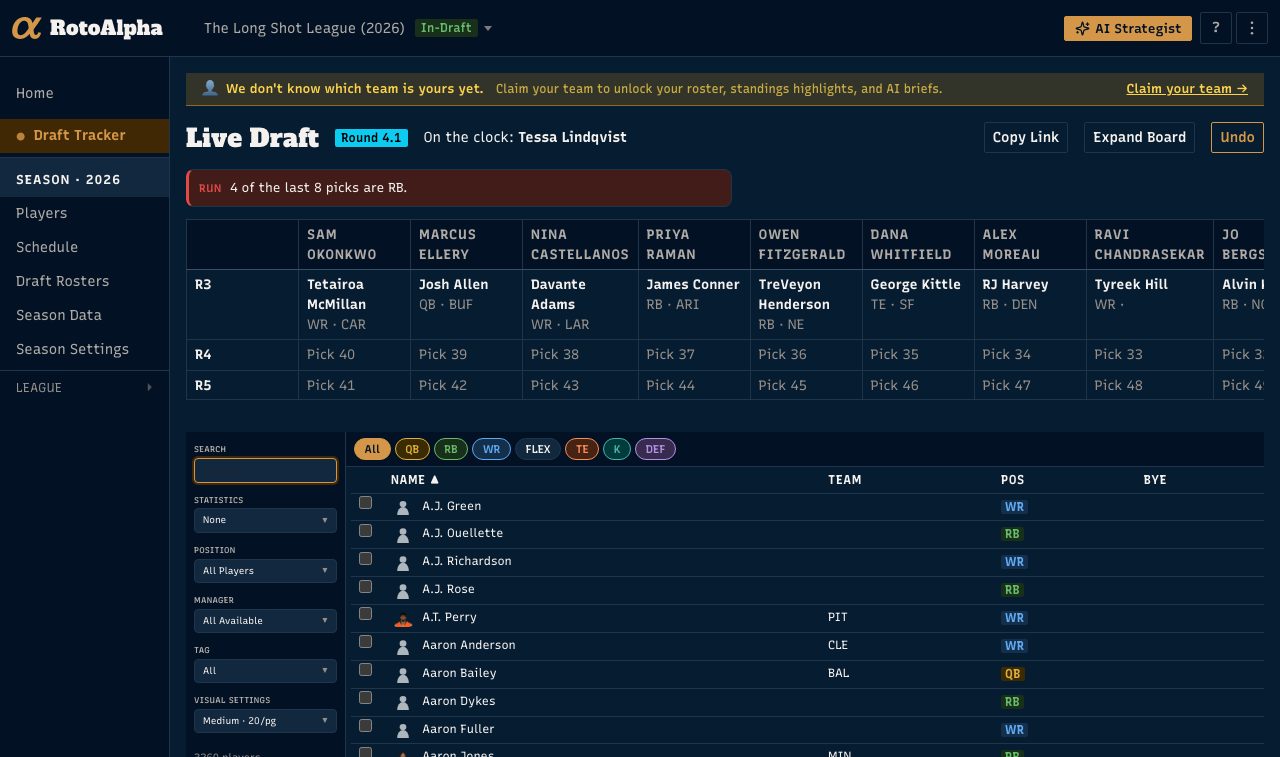
Across the top: the round and pick you are on, and who is on the clock. Your own seat is highlighted in every board column so you can find it without counting.
Below that is the compact board, showing the rounds around the current pick. Expand Board opens the whole draft at once when you want to see the shape of it.
Beside the round badge is the board's length, with a plus and a minus. If your league agrees at the table to add a round, add it here. The board grows straight away and the extra picks are yours to make. This is a fact about this draft only, so it does not change your league's roster size or next season's board. You can take a round back off as long as no picks have been made in it yet.
The player table underneath is the same board you use in draft prep, with your projections, your tiers, your notes, and your tags, filtered to who is still available. In football leagues, a VAC badge next to a name marks a player positioned to inherit volume his team lost this offseason. See Vacated Opportunities.
Entering a pick
Find the player in the table and record them to the manager who took them. The board fills in, the pool drops them, and the clock advances to the next seat.
Enter every pick, not just yours. The room's value comes from knowing what is gone: the run alerts, the rival card, and the strategist all read the same board you are filling in.
Fixing a mistake
Undo at the top reverses the most recent pick. Use it the moment you notice.
For anything else, click the cell on the board. Any cell, at any point in the draft. The editor that opens can change the player recorded there, change which manager the pick belongs to, or clear the cell entirely. Clearing puts the player back in the pool and sends the clock back to that cell, so the next pick you record fills the hole before the draft moves on.
Three things this covers:
- A pick that was traded. Set the cell to the manager who actually made the selection. The pick stays where it is on the board, because that is where it happened, and RotoAlpha remembers whose pick it originally was.
- The wrong player. Search for the right one in the editor and save.
- A manager who stepped out. Click the next manager's cell and record his pick there. The board will hold the empty cell for the absent manager and the clock comes back to it when he returns.
After the draft is over, the same editor is on the Draft Results page: the pencil beside a manager's name opens it. Use that for anything you only notice later, since a pick recorded against the wrong manager follows him through rosters, standings and his rival report all season.
What the room tells you while you draft
The rival card. When somebody else is on the clock, RotoAlpha shows what your league's own history says about them: where their picks usually go, what they chase, what they have done from this spot before. Their name links through to their full profile. This appears only if you have imported league history.
Your own marks. Anything you have noted about that manager yourself sits on the same card, kept visually separate from the computed lines. What the data says and what you say are two different things, and the card does not blur them at a glance.
Run alerts. When a position is going in a run, the room says so: how many of the last several picks were that position. If the manager on the clock has a recorded habit of joining runs, that rate is shown beside the league's own rate, so a habit the whole league shares does not read as a tell about one person.
The run alert is about the room, not about a person, so it shows on your own turn too.
The AI strategist, on any pick, with your board and your league loaded.
None of the rival card, the marks, or the run alerts reach the public draft page. They are yours.
Your league-mates watching along
Copy Link in the room's header puts the spectator link on your clipboard. Anyone you send it to can follow the draft live, with no account. See share the public draft page.
After the last pick
The room marks the draft complete on its own once every pick is in, and offers to move the season to Post-Draft. Draft Results then gives you the full board, exportable as a CSV.
Stopping early
Leagues do not always draft to the last cell. If it is late and everyone agrees to fill the rest off waivers, press End Draft. The room marks the draft complete with the empty picks left as they are, offers the same move to Post-Draft, and your league-mates watching the shared link see it finish rather than waiting on picks nobody is going to make. The rounds you never got to stay on the board, dimmed, so the record still shows what the league had planned.
Ending a draft does not lock it. If someone remembers a pick that never got recorded, click its cell and enter it as normal. Reopen Draft puts the room back the way it was.
If you drafted somewhere else and want the results in RotoAlpha afterward, you do not have to re-enter them: see paste your draft results.
More in Draft day
- Mock drafts and draft plansRehearse the draft, then keep what worked as a plan you can test.
- Build and print a cheat sheetA tiered, printable board built for your league, not a generic top 200.
- Run an auction draftNominations, winning bids, budgets, and keeper right-of-first-refusal.
- Share the public draft page with your leagueA no-signup live draft view for your league, and where the privacy line sits.
- The Vacated Opportunities reportSee which teams lost the most carries and targets, and who is positioned to take them over.