Getting started
League and season settings
The setup wizard asks for these when you create your league. This page is where you change them afterward, and what each one actually affects.
Two levels of settings
RotoAlpha separates what your league is from what a particular year looks like, because the second changes and the first does not.
- League Settings hold the league's identity: its name, when it started, and which seasons RotoAlpha is tracking. One league, one set.
- Season Settings hold everything about a single year: scoring, roster, draft format, keeper rules, waivers. Every season has its own set.
That split is deliberate. When your league changes its scoring in 2027, the 2026 profile numbers still reflect the 2026 rules, because the 2026 settings are still sitting on the 2026 season.
Both live under Settings in the left sidebar.
The Season Settings summary
Season Settings opens a summary of cards, one per section, in the same order the setup wizard asked for them. Each card shows two or three of its current values, so you can confirm the whole configuration at a glance and open only the one that is wrong. Click a card to edit that section.
If the year is still missing something a setting has to answer, a line at the top reads Still needed for this year and names each gap, with the same values picked out on the cards they belong to. A settings gap is stated rather than guessed at: a keeper league drafting by auction with only a grid cost rule on file is an open question, and a stale answer standing in for it would be worse than the admission.
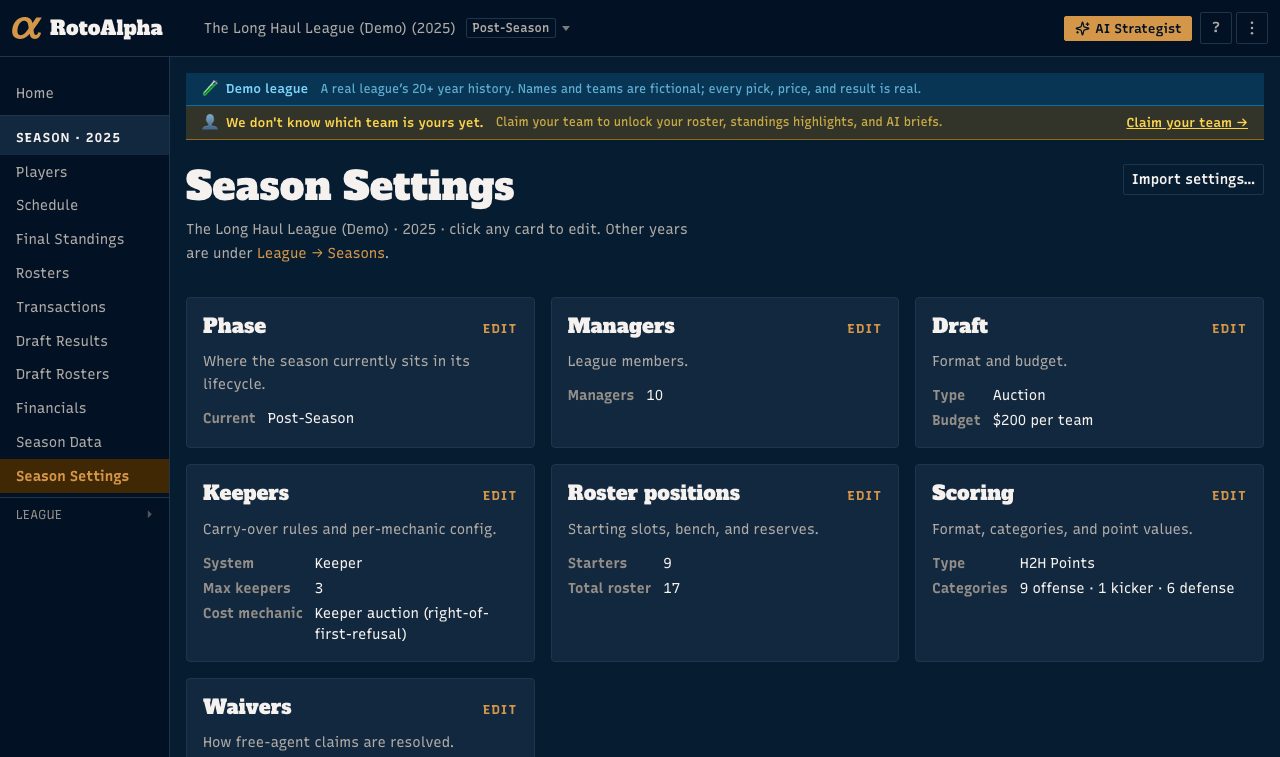
Phase
Where the season sits in its life: Pre-Draft, Keeper-Draft, In-Draft, Post-Draft, In-Season, or Post-Season.
Phase is not decoration. It decides which tools appear: keeper assignment is offered in Pre-Draft, the draft room in In-Draft, weekly lineup and waiver reads once you are In-Season. If a feature you expected is missing, the phase is the first thing to check.
Managers
Who is in the league. Manager identities are what the manager profiles are built on, so it is worth getting the names right here. See manager profiles.
Draft
The format, and the number that goes with it:
- Snake, where the pick order reverses each round.
- Linear, where it does not.
- Auction, where each team has a budget and bids.
Snake and linear leagues set a draft order. Auction leagues set a budget per team. This choice changes the draft room you get on draft night, the shape of the values RotoAlpha shows you, and which tendency numbers a profile can compute.
Keepers
Whether the league is Re-draft, Keeper, or Dynasty, and the rules that follow from it. See set up keepers for the full picture.
Roster positions
Your starting slots position by position, plus the bench and reserve spots. The card shows the two totals that matter: how many players start, and how many are on the roster overall.
Roster shape drives replacement level, which drives every dollar value and every ranking RotoAlpha produces. A league that starts three wide receivers values wide receivers differently from one that starts two, and this is where that gets encoded.
Scoring
The format, then the categories and point values inside it. RotoAlpha supports H2H Points, H2H Categories, H2H One Win, Rotisserie, and Season Points.
Football leagues configure offense, kicker, and defense categories separately. Baseball leagues configure hitting and pitching separately.
Scoring is the other half of what makes a value league-specific. Get it right before you draft off any number.
Waivers
How free-agent claims are settled: FAAB with a budget per team, Rolling priority, Reverse standings, or No waivers.
Player pool (baseball only)
Whether the league drafts from all of MLB or only one league. Football leagues never see this card.
Changing settings later
You can. Nothing is frozen after the draft. But changing scoring or roster slots after a draft changes what every value in that season means, so if you are correcting a mistake, do it before you draft, and if you are recording a rule your league changed, put it on the season it took effect in rather than editing an old one.
The faster way to fill these in
Typing all of this by hand is slow. If your league is hosted somewhere with a settings page, Settings offers Copy & paste and Upload a file under the import section, and RotoAlpha reads scoring, roster, and draft configuration out of it and shows you a preview before applying anything. See import data from a CSV.