Getting your data in
Import your league's history
Past seasons are what make RotoAlpha different from every other draft tool. One year of drafts tells you almost nothing about your league-mates. Ten years tells you who always reaches for a quarterback, who never spends on a kicker, and who runs out of money by the tenth nomination every single time.
Importing history is on the free tier, as is the tendency report it feeds.
Add a past season
A league holds one season per year, so history goes in one year at a time.
- Open League History under All-Time in the sidebar. If you've set the league's start year (in League Settings), every year the league has played is already listed: choose Start on the one you want to record. Otherwise choose + Add a past season.
- Set the year. RotoAlpha suggests the next year back and starts the new season as a copy of your nearest recorded one: managers, scoring, rosters, draft rules. A completed year is filed as post-season on its own.
- A review screen shows what came over. Change anything that was different that year, then continue to the year's page.
If the league's rules were different back then (a different roster shape, a different budget, a snake draft in the years before you switched to auction), correct the copy to what was true that year. Each season carries its own settings, and the rival reports are more honest for it.
Fill the year in
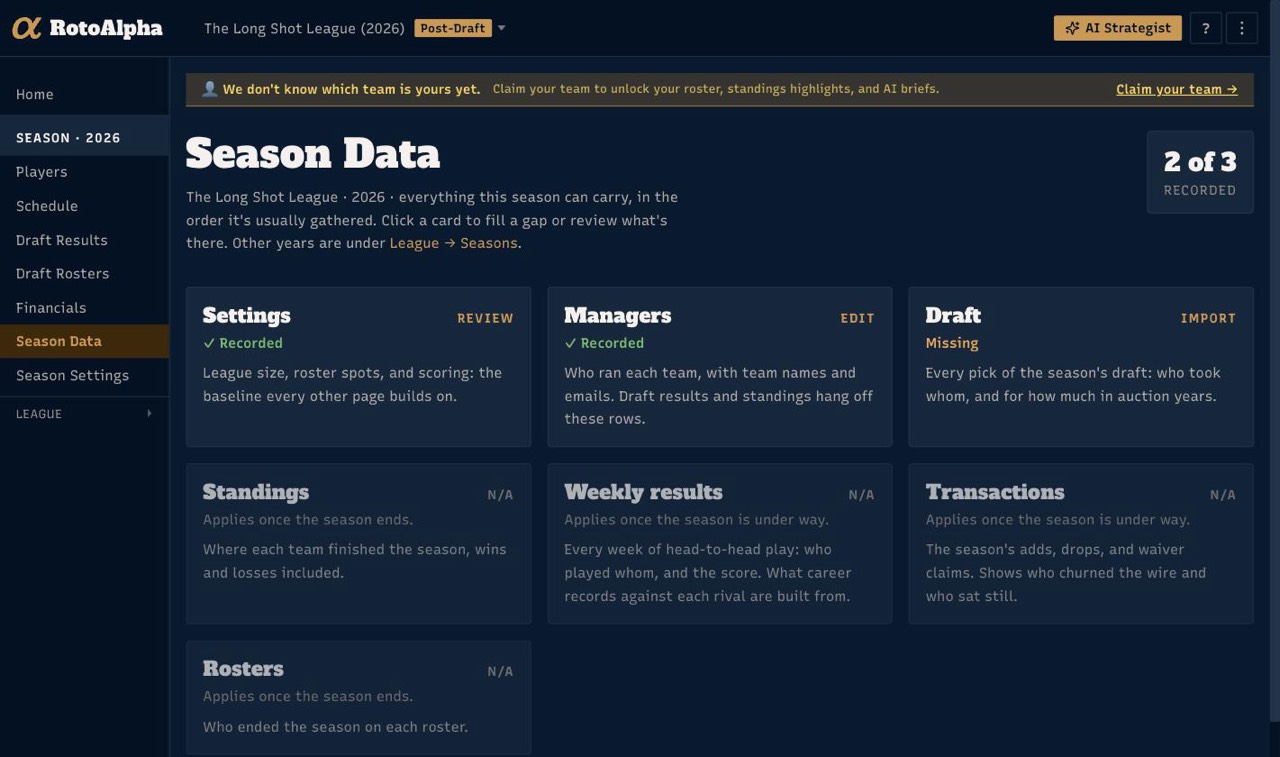
Each year has its own Season Checklist: on League History, follow Checklist → on the year's row to open it. It lists everything a year can hold, in the order it is usually gathered, as a stack of rows with a mark against what is already recorded and the next open one highlighted. Work down it. Not every piece applies to every year, and the page says which ones do not.
While you're inside a past year, a trail across the top reads League History › the year › where you are, so you always know which year you are editing and can get back out in one click. Once you step into a piece, the year's other steps ride alongside it as chips, each ticked as it's recorded. The checklist page itself does not repeat them, being the same list already open in front of you. The sidebar meanwhile stays on your current season, so getting back to your live league is never more than a glance away.
| What | Why it matters |
|---|---|
| Settings | League size, roster spots, scoring. Everything else is read against these. |
| Managers | Who ran each team, with team names. Draft picks and standings hang off these rows. |
| Draft | Every pick, with prices in auction years. This is the single most valuable thing to enter. |
| Standings | Where each team finished, wins and losses included. |
| Weekly results | Who played whom, and the score. Head-to-head leagues only. This is what career records against each rival are built from. |
| Rosters | Who ended the year on each roster. |
Most of these accept a paste or a CSV, walking the same Columns, Match Managers, Match Players and Picks steps described in paste your draft results and import data from a CSV.
If you only do one thing, do the draft. Draft history is what the tendency reports are written from. Standings and weekly results add depth; the draft is the substance.
Make sure managers line up across years
This is the step people skip, and it is the one that decides whether the history is worth anything.
Each season records its own managers, so the same person can arrive under a slightly different name in different years. Until those are linked, RotoAlpha sees several people who each drafted once instead of one person who has drafted for a decade.
Open Managers under All-Time in the sidebar and switch to the Names & identity tab. It shows each manager with the years they appear in, and gives you:
- Merge to fold two entries into one person, when the same manager arrived under two names.
- Split to pull years apart, when one name was actually two different people (a team that changed hands, most often).
- Rename to settle on the name you want shown everywhere.
- This is me to mark your own entry, which is how RotoAlpha knows which team is yours in every season.
Managing identity across years is free, so there is no reason to leave it half-done.
What you get once it is in
- Manager profiles, one per manager, written from their real draft history.
- Tendency reports showing the patterns each manager repeats.
- Career head-to-head records, where you have entered weekly results.
You do not need every year to make this worthwhile. Three or four seasons are already enough for the patterns to show.
Doing it in stages
You do not have to import everything in one sitting, and nothing is spoiled by coming back later. The League History page keeps a count of what is recorded per year, so it is easy to see where you left off.
A reasonable order, if you are working through a long history: settings and managers for every year first (they are quick), then the drafts, then everything else if you want it.
More in Getting your data in
- Paste your draft resultsCopy the draft recap from wherever your league drafted, paste it in, and check the preview.
- Import data from a CSVWhat columns are expected, how column matching works, and how to fix rows that do not match.
- Type in your draft resultsRecord picks by hand, one row at a time, when there is nothing to copy and no file to upload.
- Upload your own projectionsBring your own numbers, and understand what the active projection set changes.