Account and billing
Manage your season pass
Everything about your plan lives on one page. Open the menu in the top bar and choose Account.
What the Billing card shows
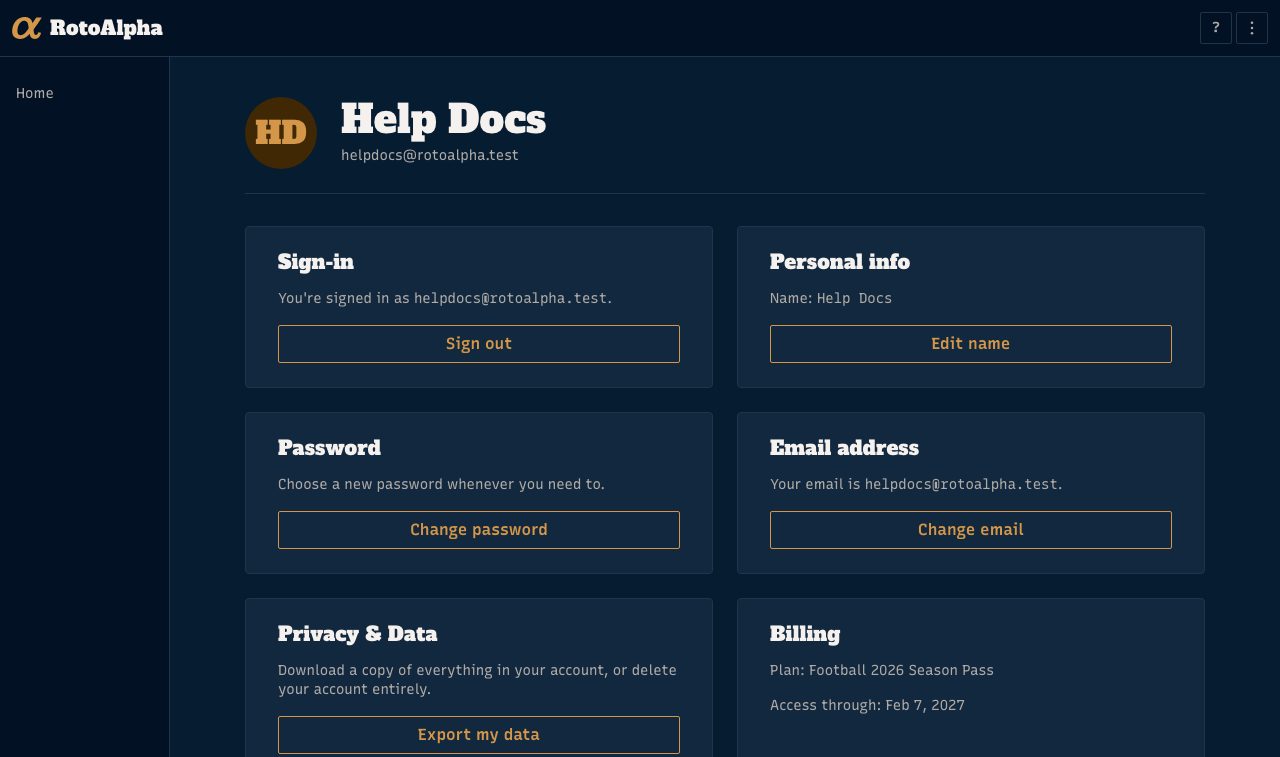
The Billing card names your plan and the date your access runs through. For the season pass that reads Access through and a calendar date, because a pass covers a fixed season rather than a billing period.
If you do not have access yet, the same card says so and offers the pass.
There is nothing to cancel
The season pass is a one-time payment. It does not renew, no card is stored for a future charge, and no cancellation is needed or possible. When the season ends on the access date, access simply ends.
This is also why the Account page shows no Manage billing button for pass holders: a one-time purchase has no subscription behind it to manage. Your receipt arrives by email at purchase time.
If your account is on an older recurring plan, a Manage billing button does appear, and it opens the payment processor's own portal where you can update your card or stop the renewal.
Receipts
The receipt for your purchase is emailed by our payment processor when the charge goes through. If you cannot find it, check the address you registered with, then email us and we will resend it.
Refunds
The pass is refundable in full through your first real draft. Email us within 7 days of that draft and we will refund it. No form, no reason required.
Switch which sport your pass covers
If you bought the pass and have not built a league yet, the Billing card offers Change sport. Pick the other sport and save. Once a league exists under the pass the control goes away, because moving the pass would lock you out of the league you already built.
When access ends
Nothing is deleted. Your leagues, seasons, and history stay yours to view, and you land back on the free tier, which keeps the full rival tendency report for one league per sport. See what is free and what the pass adds.
Everything else on the Account page
The same page is where you change your name, your password, and your email address. Changing your password or your email signs you out, so you sign back in with the new one. An email change sends a 6-digit code to the new address and your old one keeps working until you enter that code.
To leave for good, see delete your account.