Account and billing
Delete your account
You can close your RotoAlpha account yourself, from the app, without emailing anyone. Take a copy of your data first if you want one.
Export your data first
Open the menu in the top bar, choose Account, and find the Privacy & Data card. Export my data builds a single JSON file containing everything we hold for your account: your profile, your leagues and seasons, your imported history, your projections, and the reports built from them.
The download link is generated on the spot and is good for one hour. If it expires before you use it, press the button again.
Do this before deleting rather than after. Once the grace period runs out there is nothing left to export.
Delete the account
At the bottom of the same page, under Delete account, choose Delete my account. You will be asked to type your email address to confirm, which is deliberate friction on a one-way door.
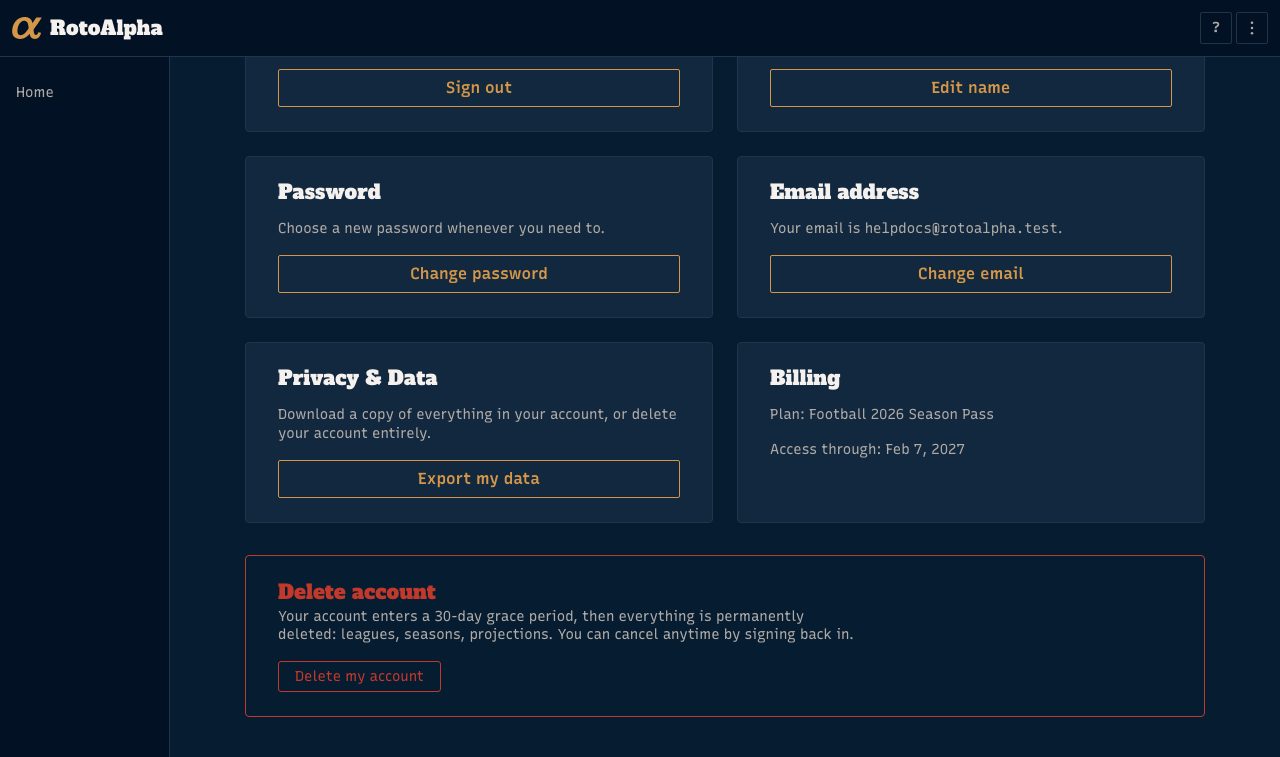
The 30-day grace period
Deleting does not wipe anything immediately. Your account is scheduled for deletion in 30 days, and you are signed out.
During those 30 days nothing of yours is reachable, but nothing is gone either. After 30 days everything is permanently removed: your leagues, your seasons, your imported history, and your uploaded projections. That step cannot be undone and we cannot recover it for you afterward.
Change your mind
Sign back in with the same email and password at any point during the 30 days. Instead of your leagues you will land on a short page naming the date your account is due to be deleted, with a Reactivate my account button. Press it and the deletion is called off. Your leagues and history come back exactly as you left them.
What deleting does not do
- It does not refund your season pass. Refunds are handled separately and the window is tied to your draft, not your account. See managing your season pass.
- It does not remove you from someone else's league. Public pages your league-mates view belong to whoever created that league. If you appear as a manager in a league somebody else built, that is their data to edit.
- It is not how you switch email addresses. The Account page changes your email in place, and you keep everything.